The #1 layout for poker clients
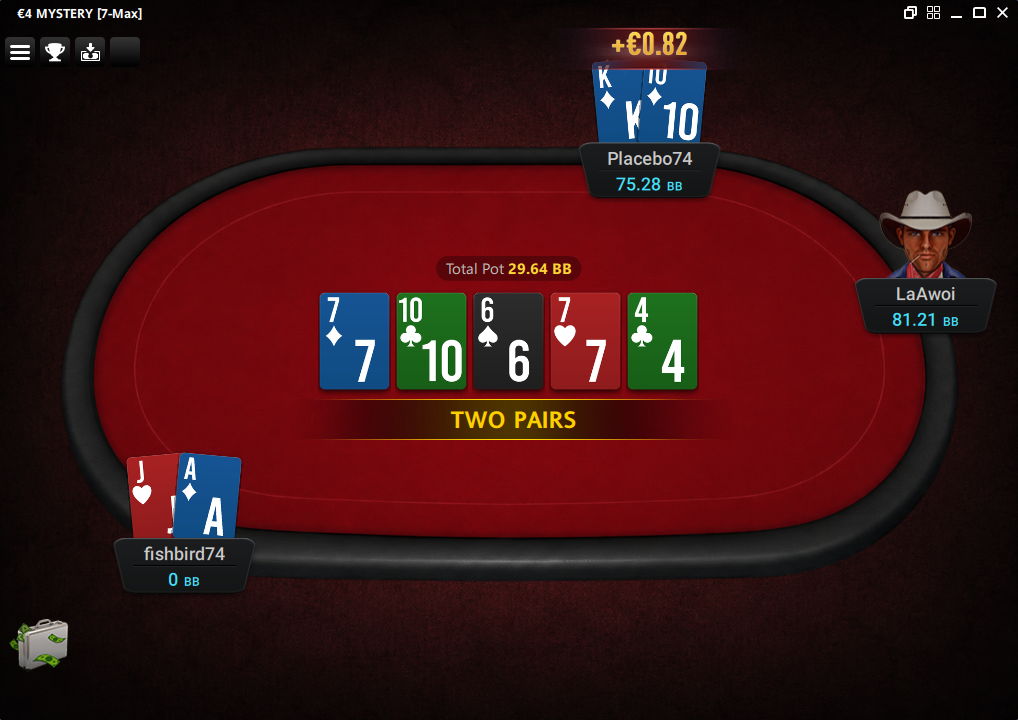
PokerLay replaces the dated default tables and cards in your poker client with a clean, modern look — instantly, without lag.
Works with the desktop clients you already play on





Play any room with comfort and style
PokerLay is a curated collection of ready-made layouts. Pick one and the whole table is redrawn — cards, chips, felt, and background.
Ready-made layouts
No sliders, no pixel-pushing. Pick one of the layouts and the table changes all at once.
Everything matched
Each layout has tables, cards, chips, and background chosen to look cohesive — no mashups.
Apply in one click
Pick → click → done. No config files, no command line, no fuss.
Light and lag-free
Doesn't weigh down your client. Long sessions stay smooth.
Cosmetic only
Only how the table looks on your screen changes. PokerLay never touches the game, cards dealt, or your account.
Switch on the fly
Change layouts without leaving the table. New skins from the collection arrive automatically.
Up and running in three steps
No technical setup. If you can install an app, you can use PokerLay.
Download & install
Grab the free trial and run the installer. Setup takes under a minute.
Open your poker client
Launch Red Star (or your iPoker client) and sit at a table as usual.
Pick a skin & apply
Open PokerLay, choose a table skin, and click apply. Your tables transform instantly.
Frequently asked questions
Which poker clients does PokerLay support?
PokerLay currently supports Red Star Poker and other iPoker network desktop clients on Windows. Support for more clients is in progress.
Is this safe for my account?
PokerLay is purely cosmetic — it changes how tables, cards, and chips look on your screen. It does not read or change gameplay, cards dealt, or interact with your account in any way.
Do I need to be technical to use it?
No. PokerLay is a simple app with buttons: pick a skin, click apply. No config files or command line.
Does it work on Mac?
PokerLay is Windows-only for now, matching the desktop poker clients it supports.